|
HOW TO CHANGE A RESULT
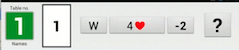
The (red) back arrow can be used if you unintentionally happen to touch a button. To go back several steps via the back arrow is not recommended, however. It is easier to amend the entries via the buttons in the header.
Board icon
You can use the board icon when the result is correctly entered, but the board number is wrong.
Declarer
Click on the declarer button (N/E/S/W) in the header to change the declarer. You will be prompted to enter the lead anew when the declarer has been changed.
Contract
The contract button is used when the final bid, and/or X/XX (D/RD), need to be changed.
Lead
The lead is dependent on the declarer’s position. You therefore need to click on the declarer (W in the example) to amend an incorrectly entered lead. This will prompt you to enter the lead even if you do not change the declarer.
Tricks
You can use the tricks [made] button when you need to change this entry.
All wrong?
You are recommended to use the (red) “No” button on the “Result OK?” screen when the result is totally wrong.
CLEAR BUTTON
Some screens (e.g. the Lead) also have a clear button that erases the last entry.
|