|
NO COMMUNICATION
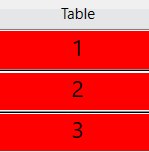
The reason why no table in the grid become green can be:
i. That you have forgotten to click the green Start button (or F2) in the main interface.
ii. That the tablets and the PC are using different networks.
iii. IPs do not match
WiFi icon
Both the BTs and BTC should show a green WiFi icon.
The computer and/or the tablet is connected to a network that cannot be used if the green icon is striked, c.f. IP below.
Red icon with ?-mark indicates that the network has been changed since the start of BTC. All is well if the table column is green and results come in as they should. But if results cease to drop in something is wrong and you should try to revert to the original network.
See the Network page in BTs help if the WiFi icon on the BTs would not be green.
Network name & IP address
The IP that the computer has connected to is shown in BTC’s main interface. The IP should (normally) read 192.168.0.+1-3 digits. 127.0.0.1 indicates that the network cannot be used.
If the network name is shown on the BTs, it should be sufficient to check that it is the same network as the computer has connected to.
SOME REDMARKED TABLES
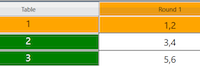
The reason why some (but not all) of the tables are redmarked in the grid can be that the red table(s) have a [too] weak WiFi signal. We suggest that you bring these tablets closer to the WiFi base (the router) and start the BTs from there. They will then run offline until the game is finished.
The grid will look as shown in the lower illustration to the right during the session, but there are no worries so long as there is no change of movement. When the game has finished you ask the players to bring the offline unit(s) back to the WiFi base to have the results uploaded to BTC.

|