|
You should change the settings that appear at the first start of an event (to fit your standard). This is done via the Default Settings dialog that is found in the Settings menu.
You can select Settings from Scoring software in Default Settings if you want to give the settings coming from the scoring program priority.
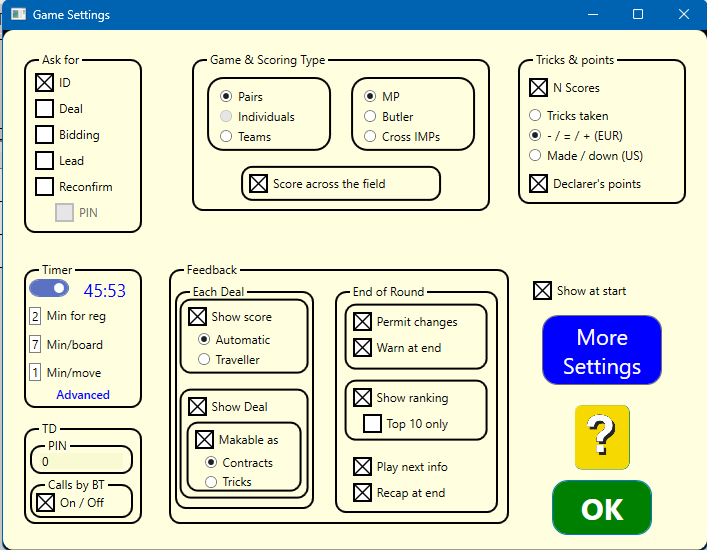
ASK PLAYERS FOR...
ID: The players enter a number (typically their member number) at start. Their entries will be immediately validated so that the players themselves can correct their mistakes, provided that Player Names have been loaded into the system.
Deal: The players are prompted to enter the deals.
Bidding: The bidding is entered bid by bid. Note that this option requires an additional licence.
Lead: The players are asked to enter the first lead.
Reconfirmation: East’s (or West’s) reconfirmation of the result is required.
PIN codes:The players are prompted to enter a PIN code at start that is later on required when the results are reconfirmed.
TIMING
Set the allowed time in minutes for registration, play and move if you want the tablets to count down the time. The timing is governed by the Start/Stop button and the timer on/off switch. See Advanced Timer for details.
TD
PIN: You can block access to the tabletops’ hidden menu by entering a PIN code other than 0.
Calls by BT: The TD can be called to the table by clicking the TD button on the tablet. This option requires a supplementary TD licence.
GAME & SCORING TYPE
You should set the game type before start as it will be difficult to change it during the game. The scoring method can be changed anytime.
Note that rulings will not be considered in the provisional scoring made by the BridgeTabs.
Teams-Pairs-Individual
Team tournaments are scored with IMPs. At Pairs and individuals you have a choice between MP, Butler and Cross IMPs.
MP: Feedback given at the tables is based on matchpoints.
IMP: Feedback at the table is a percentage based on IMPs. The calculation method is explained in detail in a separate memo.
Across the field: Frequencies and ranking given at the table will be based on the results from all sections.
|